There's a useful distinction to make up front. Most of FlowFn's API surfaces are about your app's runtime — a form accepts submissions, an MCP server exposes an app's tools. The Platform Access feature is different: it's the control plane. It lets you create, update, and list the FlowFn resources themselves — spin up an app, author a workflow, add an agent — programmatically, across every team you belong to.
It comes in two flavors that share one credential:
- REST at
https://api.flowfn.com/v1— for scripts, CI, Postman, anything that speaks HTTP. - Management MCP at
https://mcp.flowfn.com/mcp/manage/v1— the same authoring power exposed to an AI client (Claude Desktop, Cursor, ChatGPT), so you can author FlowFn by asking.
Both authenticate with one Personal Access Token (PAT), which you generate here — My Account → Platform Access:
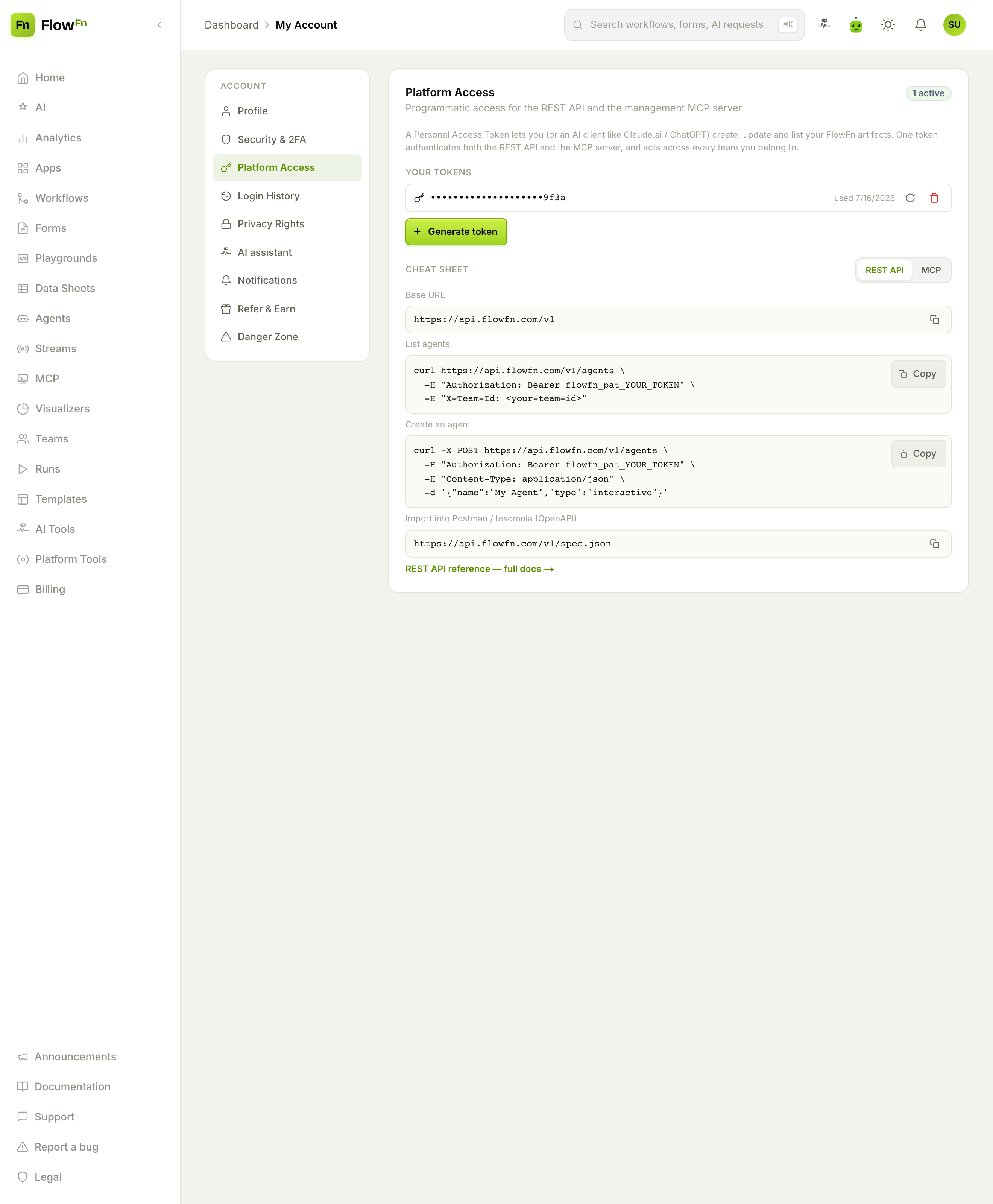
The whole card is the integration guide: your tokens, a one-click Generate token, and a copy-paste cheat sheet with the base URL, ready-made curls, and the OpenAPI spec URL.
Step 1 — Generate a token
There's no form here — no scopes, no expiry to configure. You click Generate token and it's minted instantly, shown to you exactly once:
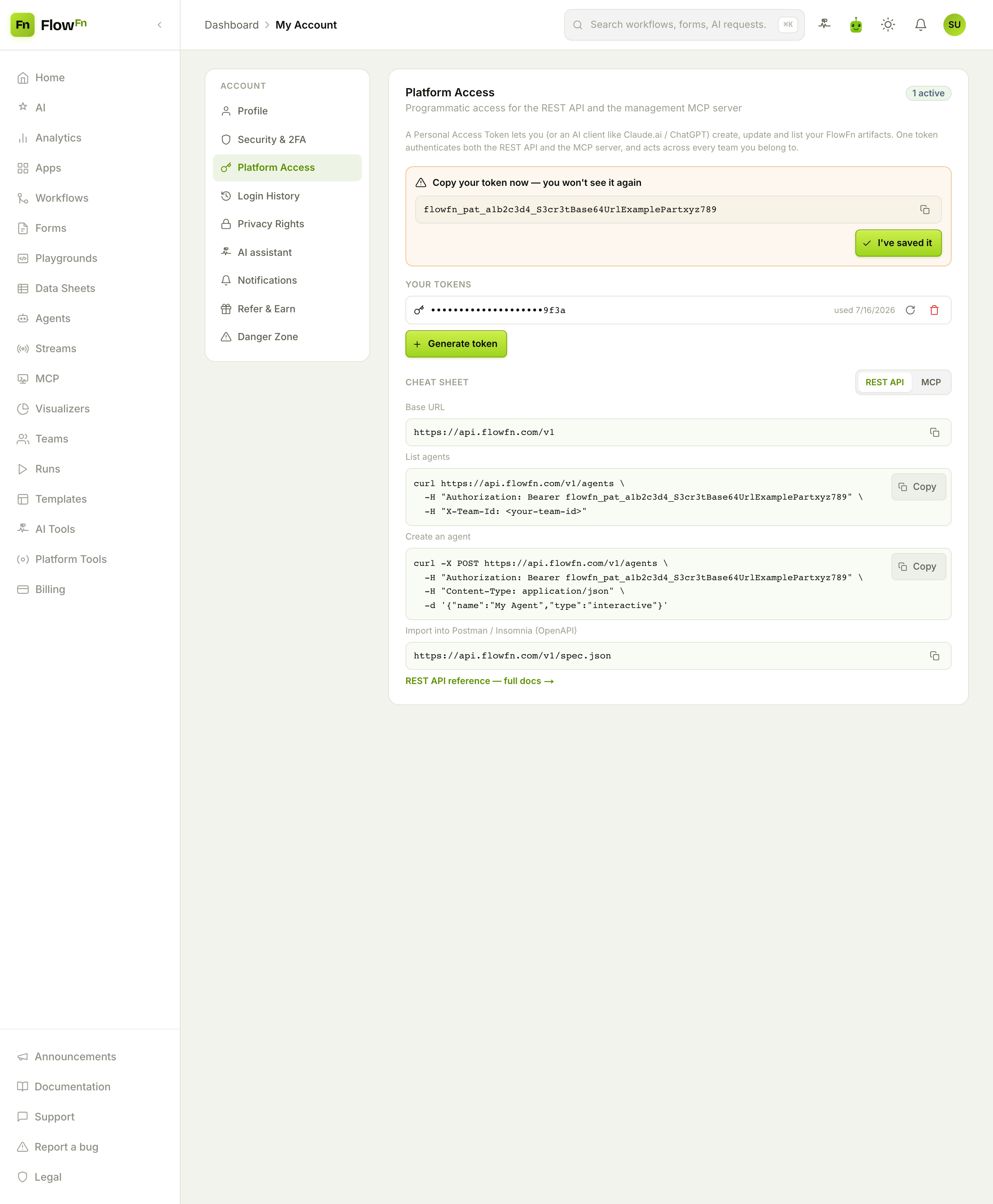
Copy it now — after you dismiss that panel it's gone for good (only the last four characters remain, since it's hashed at rest). A PAT is an account-wide credential that acts across every team you belong to; if it leaks, you Rotate it (which mints a new one and kills the old) or Revoke it. That's the entire lifecycle: generate, use, rotate/revoke.
Step 2a — Use it over REST
Send the token as a Bearer header (or X-API-Key), and tell the call which team to act in with X-Team-Id:
# list your agents
curl https://api.flowfn.com/v1/agents \
  -H "Authorization: Bearer flowfn_pat_…" \
  -H "X-Team-Id: <your-team-id>"

# create one
curl -X POST https://api.flowfn.com/v1/agents \
  -H "Authorization: Bearer flowfn_pat_…" \
  -H "Content-Type: application/json" \
  -d '{"name":"My Agent","type":"interactive"}'
The API covers the resources you'd build in the dashboard — apps, workflows, agents, streams, forms, visualizers, playgrounds, databases and data-sheet rows — with list/create/update operations (databases and rows are list/create only). It's an authoring API, so there's no destructive delete. There's a live OpenAPI spec at /v1/spec.json you can import straight into Postman or Insomnia. And authoring is free — no credits are charged; you're only bounded by the same per-plan resource limits as building by hand.
Step 2b — Use it from an AI client
Here's the fun part. Point an MCP client at the management endpoint with the same token, and your AI assistant can author FlowFn for you:
{
  "mcpServers": {
    "flowfn": {
      "url": "https://mcp.flowfn.com/mcp/manage/v1",
      "headers": { "Authorization": "Bearer flowfn_pat_…" }
    }
  }
}
Now "create a data sheet called leads with name, email, and status columns, then a workflow that emails me when a new row lands" becomes a thing you say, and the assistant makes the calls. Same authoring core, same permissions, same plan gates — just driven by a model instead of curl.
Good to know
- Three "MCP/API" things, don't conflate them. This control-plane (
/mcp/manage/v1+ aflowfn_pat_…token) is not an app-hosted MCP server (/mcp/v1/<code>, which exposes one app's runtime tools), and not an App's code+key. Same protocol, different jobs. - Two independent plan gates. REST access (
allow_platform_api) and MCP access (allow_platform_mcp) are separate — your plan may grant one, both, or neither. - Permissions still apply. The API acts with your role in the target team, and honors the same plan limits and slug/subdomain checks as the dashboard — you can't bypass anything by going through the API.
- Rotate is instant and global. One token backs both surfaces; rotating it breaks every connected client (curl, Postman, Claude, Cursor) on the next request, so re-paste everywhere.
Wrap-up
The Platform Access feature makes FlowFn scriptable. Generate one personal token and you can drive your whole workspace two ways: over REST for scripts and CI, or through the Management MCP so an AI client authors resources on your behalf — both hitting the same authoring core, free of credit charges, bounded only by your plan's normal limits. It's the bridge between "I build in the dashboard" and "my tooling (or my AI) builds for me."
Generate a token, drop the /v1/spec.json URL into Postman, and list your agents — you're automating FlowFn in five minutes. Last stop in the series: the money layer — Billing, credits & cost guards. Make the platform itself programmable, and your workflow for building workflows gets faster too.