The Billing page is the money dashboard. Its default Usage tab tells you three things at a glance — your plan, your credit balance, and how much of your plan you've used:
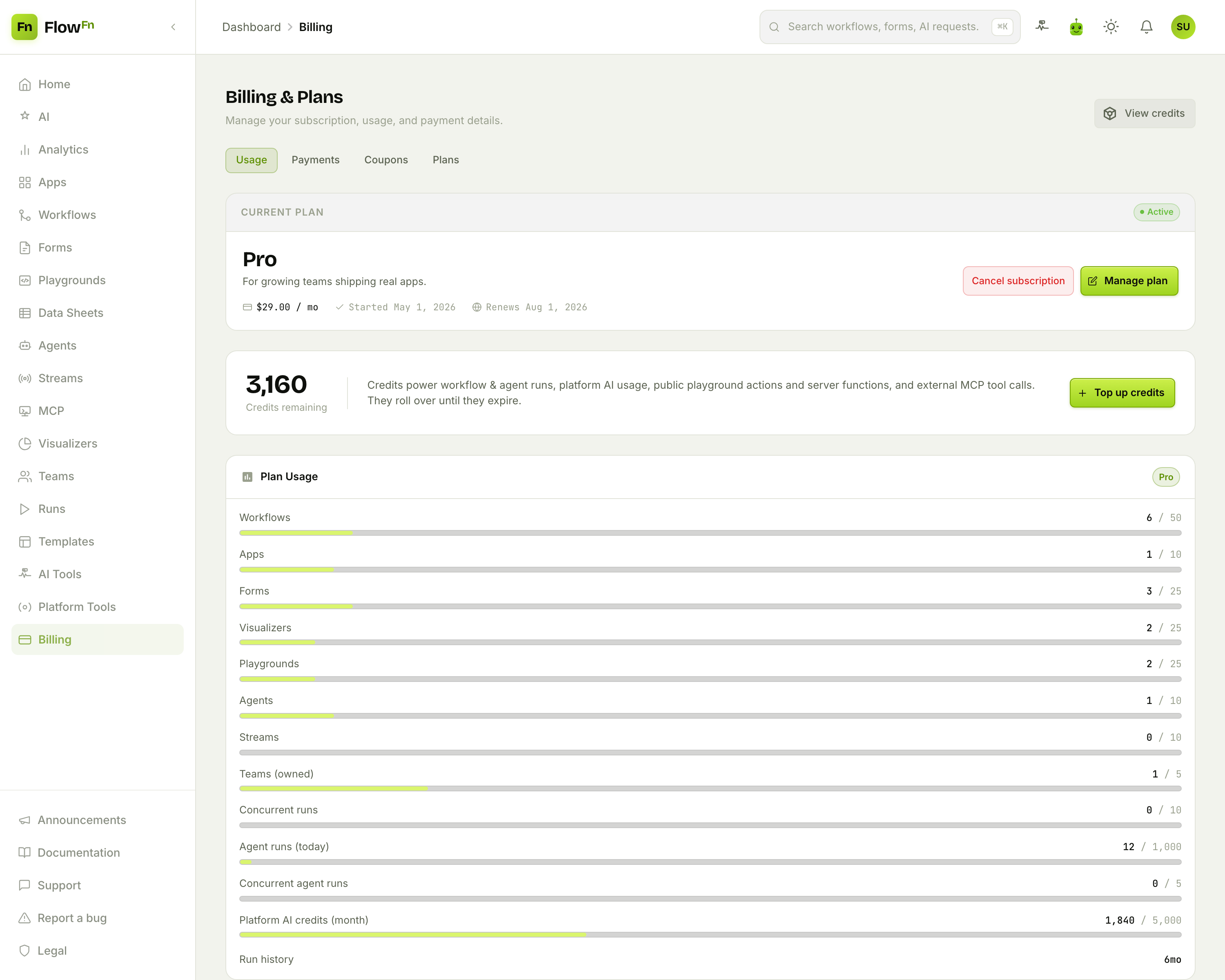
Let's unpack each.
Credits: what runs costs
Credits are FlowFn's unit of consumption. They're spent when things run:
- a workflow run or agent run (a small base fee plus per-step costs),
- platform AI on FlowFn's shared key (metered by tokens),
- a platform-tool call (Slack, Stripe, …), a public playground action, an external MCP tool call.
They roll over until they expire, your plan grants a batch each cycle, and you can Top up any time. One important rule: for team-owned work, credits are charged to the team owner — so a public form your teammate built spends your credits if you own the team. (And remember from the BYOK post: AI on your own key doesn't touch credits at all.)
Every debit and grant is recorded in an append-only ledger (the View credits link), so you can always see exactly where credits went.
Plan usage: your limits
Below the balance, the Plan Usage card shows a bar for every limit your plan sets — workflows, apps, forms, agents, streams, concurrent runs, monthly platform-AI credits, and more — each as used / cap:
The bars are color-aware: they warm to amber past ~75% and go red past ~90%, so you can see what you're about to outgrow before you hit it. An unlimited cap shows ∞. This is the fast way to answer "can I make one more agent?" or "am I about to run out of AI credits this month?"
Cost guards: protecting your public surfaces
Here's the part that matters most once your app is live. Anything a stranger can hit — a public playground, a form, a visualizer, an agent widget, a stream, a webhook, an MCP server — can be driven by third-party traffic you don't control. Cost guards put a daily ceiling on each of those, per resource:
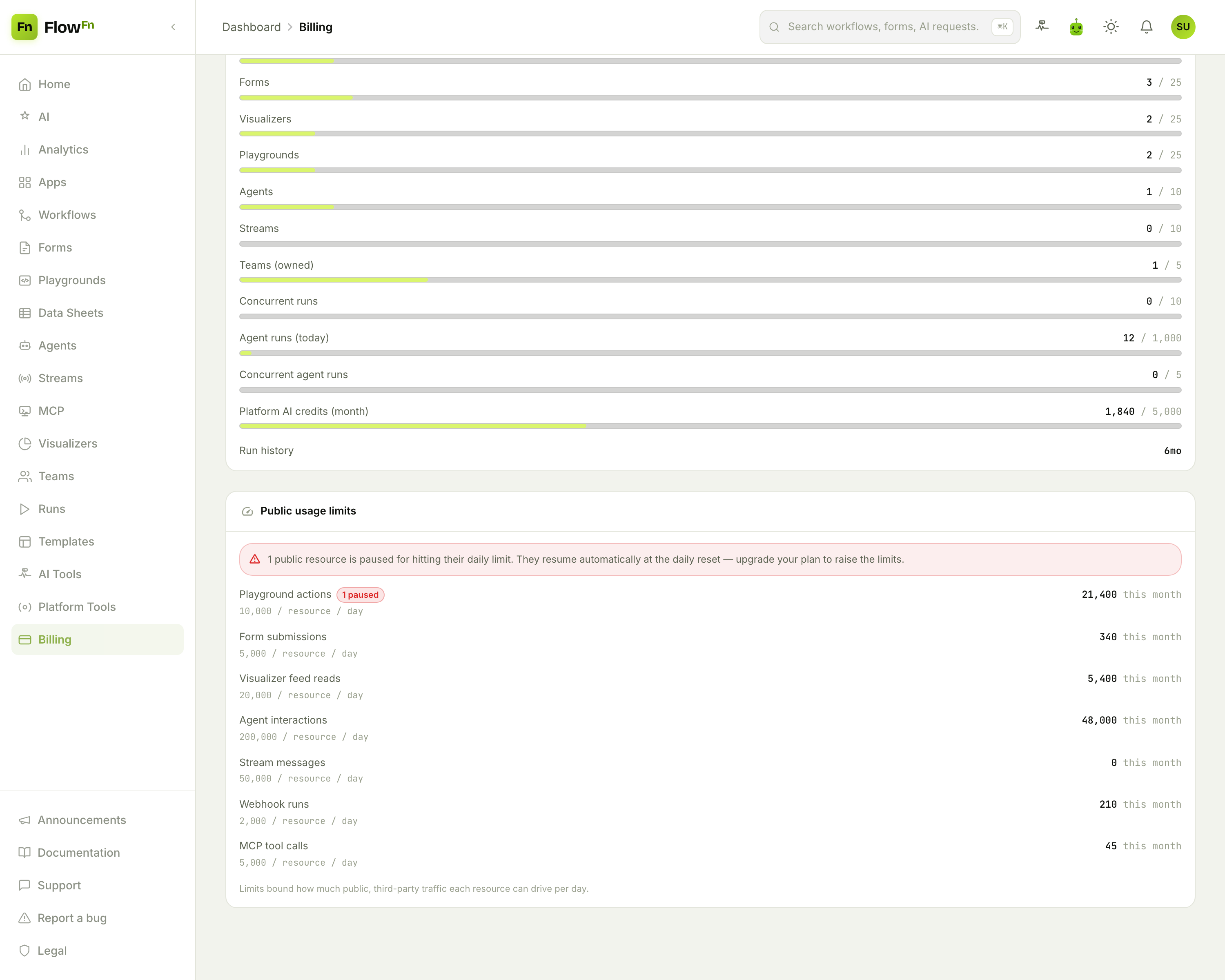
Each public surface has a daily cap, and the card shows this month's usage against it. When a resource crosses its daily cap, new requests get a rate-limit response that clears on its own at the next daily reset. If traffic keeps hammering it well past the cap, a breaker trips and pauses the resource entirely until the reset (or an upgrade) — and that hard-paused state is what the 1 paused badge counts. Here, a runaway playground has tripped it, and the banner explains it'll resume automatically.
The mechanics are worth knowing: as a resource approaches its cap you (the owner) get a budget alert; at the cap it returns a rate-limit error to visitors; and far past it, a "panic" breaker hard-pauses the resource immediately rather than letting the overage keep climbing. It's the difference between "my form got popular and cost me $40 overnight" and "my form hit its limit and paused itself." The guard is the safety net under everything you make public.
The rest of the page
Three more tabs round it out: Plans (compare tiers and upgrade/downgrade), Payments (your cards and invoice history, via Stripe), and Coupons (any discount codes issued to you). And because billing is a real team responsibility, it's a delegable role — you can give someone the Billing role so they manage this page without touching your workflows (see Teams & roles).
Wrap-up
FlowFn's money layer is three ideas working together: credits meter what you run and roll over until they expire; plan limits cap how much you can build (shown as friendly usage bars); and cost guards put a daily ceiling on every public surface so third-party traffic can pause a resource instead of draining your account. Charges land on the team owner, and BYOK AI stays off the meter entirely.
Open your Billing page, glance at the Plan Usage bars to see what you're close to outgrowing, and check the Public usage limits before you promote anything with a public URL — that's the habit that keeps surprises off your invoice.
And that wraps the series. From your first workflow to the App that hosts it, the integrations it calls, the runs you inspect, and the credits it spends — you've now got the whole platform. Know what it costs, cap what it can spend, and ship without holding your breath.